Configuring Polaris as a metastore for Spark
This topic describes the full integration of the MCP server with Apache Polaris, Apache Spark, and Keycloak SSO.
Data Flow
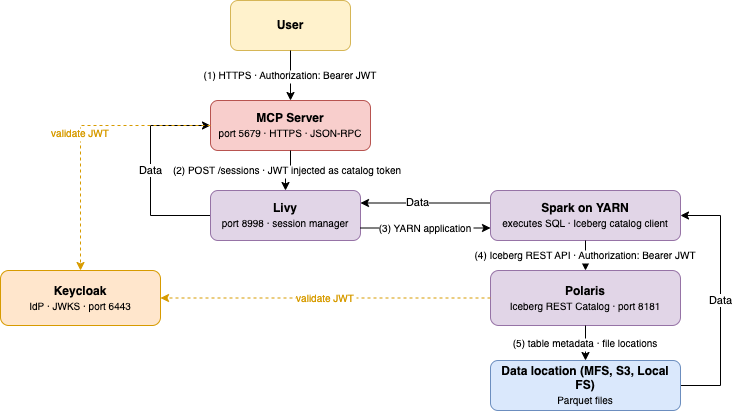
-
User → MCP Server — HTTPS request with
Authorization:
                                Bearer <JWT>
(or Basic auth). Contains the MCP tool call (create_sql_session or execute_query). -
MCP Server → Livy — Creates a Spark session. Injects the user's JWT into the session config as the Polaris catalog token. Spark starts on YARN.
-
Spark execution — Spark executes the SQL. Before reading any table, it calls Polaris to resolve table metadata and file locations.
-
Spark → Polaris — Iceberg REST API call with the user's JWT in
Authorization: Bearer. Polaris validates the token against Keycloak, resolves the Polaris principal, and checks catalog role privileges. -
Spark → MapR FS — Reads Parquet files at the locations returned by Polaris. Returns rows to Livy, which returns them to MCP Server, which returns them to the user.
Authentication Flow (SSO)
On first connection, the client (for example, mcp-remote) triggers
an OAuth PKCE flow — a browser window opens to Keycloak. After the user logs in,
Keycloak issues an access token + refresh token. The access token is sent with every
subsequent MCP request. The MCP server validates the JWT signature using Keycloak's
JWKS endpoint, then forwards the same token to Polaris.
-
Single credential end-to-end. The user's Keycloak JWT is used by MCP Server, Spark, and Polaris. No service account impersonation.
-
Polaris principal = Keycloak username. Polaris extracts the
preferred_usernameclaim from the JWT to identify the principal. The names must match exactly. -
The Spark catalog configuration is injected dynamically. The MCP server injects the Polaris catalog URL, warehouse, and user JWT into the Livy session config at creation time. No static Spark catalog config is needed in
spark-defaults.conf.
Keycloak Setup
Keycloak runs on port 6443, realm master. The
edf-client OAuth client is pre-configured by the platform
installation. It must be of type confidential with
client_credentials and authorization_code
grant types enabled.
ADMIN_TOKEN=$(curl -sk -X POST \
  https://<keycloak-host>:6443/realms/master/protocol/openid-connect/token \
  -H "Content-Type: application/x-www-form-urlencoded" \
  -d "client_id=admin-cli&username=admin&password=<admin-password>&grant_type=password" \
  | jq -r .access_token)
Create a user
curl -sk -X POST https://<keycloak-host>:6443/admin/realms/master/users \
  -H "Authorization: Bearer $ADMIN_TOKEN" \
  -H "Content-Type: application/json" \
  -d '{
    "username": "mapruser1",
    "enabled": true,
    "credentials": [{"type": "password", "value": "mapruser1", "temporary": false}]
  }'
Obtain the edf-client secret
edf-client secret is needed when configuring the MCP client
(Claude Code, Claude Desktop, etc.). It rotates when the cluster is
reinstalled.CLIENT_UUID=$(curl -sk \
"https://<keycloak-host>:6443/admin/realms/master/clients?clientId=edf-client" \
-H "Authorization: Bearer $ADMIN_TOKEN" | jq -r '.[0].id')
CLIENT_SECRET=$(curl -sk \
"https://<keycloak-host>:6443/admin/realms/master/clients/$CLIENT_UUID/client-secret" \
-H "Authorization: Bearer $ADMIN_TOKEN" | jq -r .value)
echo $CLIENT_SECRETPolaris Setup
Polaris runs on port 8181. Administration is supported by the
Polaris CLI or REST API. Authenticate using service account credentials
(edf-client), not the user's credentials.
POLARIS_TOKEN=$(curl -sk -X POST \
  https://<keycloak-host>:6443/realms/master/protocol/openid-connect/token \
  -d "client_id=edf-client&client_secret=$CLIENT_SECRET&grant_type=client_credentials" \
| jq -r .access_token)POLARIS=/opt/mapr/polaris/current/client/bin/polaris
$POLARIS --access-token $POLARIS_TOKEN \
catalogs create \
--storage-type MFS \
--default-base-location maprfs:///polaris/mcp-warehouse \
mcp-catalogCreate the Polaris principal name
$POLARIS --access-token $POLARIS_TOKEN principals create mapruser1Create roles
There are two types of roles:
-
Principal role - assigned to a principal; groups catalog roles
-
Catalog role - scoped to a specific catalog; holds catalog privileges
# Principal role
$POLARIS --access-token $POLARIS_TOKEN principal-roles create mcp-principal-role

# Catalog role
$POLARIS --access-token $POLARIS_TOKEN catalog-roles create \
  --catalog mcp-catalog mcp-catalog-role
Grant privileges
# Grant full catalog access to the catalog role
$POLARIS --access-token $POLARIS_TOKEN privileges catalog grant \
  --catalog mcp-catalog \
  --catalog-role mcp-catalog-role \
  CATALOG_MANAGE_CONTENT
Available privileges: CATALOG_MANAGE_CONTENT (full DDL+DML),
TABLE_READ_DATA (SELECT only),
TABLE_WRITE_DATA, NAMESPACE_CREATE
# Attach catalog role to principal role
$POLARIS --access-token $POLARIS_TOKEN catalog-roles grant \
  --catalog mcp-catalog \
  --principal-role mcp-principal-role \
  mcp-catalog-role

# Attach principal role to principal
$POLARIS --access-token $POLARIS_TOKEN principal-roles grant \
  --principal mapruser1 \
  mcp-principal-role
MCP server configuration
/opt/mapr/data-access-gateway/conf/mcp-server.confmcp = {
http = {
port = 5679
secure = true
auth.enabled = true
}
file.enabled = true
spark {
enabled = true
impersonation-enabled = true # Run Spark jobs as the authenticated user
disable-sql-policy = true # Allow DDL/DML (CREATE, INSERT, DROP)
iceberg {
catalog {
backend = "polaris"
name = "mcp-catalog"
uri = "https://<polaris-host>:8181/api/catalog"
warehouse = "mcp-catalog"
use-bearer-token = true # Forward user JWT to Polaris
scope = "PRINCIPAL_ROLE:ALL"
token-refresh-enabled = true
access-delegation = "vended-credentials"
client.region = "us-east-1"
}
}
}
}| Option | Description |
|---|---|
impersonation-enabled |
Livy starts the Spark job under the user's Linux account (MapR ticket required) |
disable-sql-policy |
Without this, only |
use-bearer-token |
When |
scope |
Polaris OAuth scope. |
maprcli node services -name data-access-gateway -action restart -nodes $(hostname -f)Spark configuration
/opt/mapr/spark/spark-3.5.5/conf/spark-defaults.confspark.jars.ext-libs.use true
spark.sql.extensions org.apache.iceberg.spark.extensions.IcebergSparkSessionExtensionsspark.sql.catalog.* entries here for the Polaris catalog. The MCP
server injects the full catalog configuration dynamically at session creation
time:spark.sql.catalog.mcp-catalog org.apache.iceberg.spark.SparkCatalog
spark.sql.catalog.mcp-catalog.type rest
spark.sql.catalog.mcp-catalog.uri https://<polaris-host>:8181/api/catalog
spark.sql.catalog.mcp-catalog.warehouse mcp-catalog
spark.sql.catalog.mcp-catalog.rest.auth.type oauth2
spark.sql.catalog.mcp-catalog.token <user JWT>
spark.sql.catalog.mcp-catalog.scope PRINCIPAL_ROLE:ALLspark.sql.catalog.hive org.apache.iceberg.spark.SparkCatalog
spark.sql.catalog.hive.type hive
spark.sql.catalog.hive.uri thrift://<hive-host>:9083Claude Code Configuration
- Global:
~/.claude.json- applies to all projects - Project-level:
.claude/settings.json(committed) or.claude/settings.local.json(ignored by Git, for secrets)
claude mcp add spark-mcp \
  --env NODE_TLS_REJECT_UNAUTHORIZED=0 \
  -- npx -y mcp-remote https://<mcp-host>:5679/spark \
  --static-oauth-client-info "{\"client_id\":\"edf-client\",\"client_secret\":\"$CLIENT_SECRET\"}" \
  --debug
--scope user adds it globally; without the flag it's scoped to the
current project.
.claude/settings.local.json
directly:{
"mcpServers": {
"spark-mcp": {
"command": "npx",
"args": [
"-y",
"mcp-remote",
"https://<mcp-host>:5679/spark",
"--static-oauth-client-info",
"{\"client_id\":\"edf-client\",\"client_secret\":\"<edf-client-secret>\"}",
"--debug"
],
"env": {
"NODE_TLS_REJECT_UNAUTHORIZED": "0"
}
}
}
}NODE_TLS_REJECT_UNAUTHORIZED=0 disables TLS certificate verification
- this is required when the cluster uses a self-signed MapR CA certificate.
First launch - SSO login
On the first claude session after adding the server,
mcp-remote prints a URL to the terminal. Open it in a browser
and log in with your cluster credentials. After login, the token is cached at
~/.mcp-auth/mcp-remote-*/ and reused on subsequent runs.
rm -rf ~/.mcp-auth/mcp-remote-*/claude mcp list # Should show spark-mcp
claude mcp get spark-mcp # Shows connection status and available toolsExample Prompt
claudeUse a natural prompt. For example:
I need to analyze user activity data. First, set up a Spark session, then show me what tables are available in the mcp-catalog. After that, count the number of events per user for the last 7 days and show me the top 10 most active users.
-
Call
create_sql_session- waits ~2 min for Spark to start on YARN - Call
execute_querywithSHOW NAMESPACES IN \mcp-catalog`` -
Call
execute_querywithSHOW TABLES IN \mcp-catalog`.db` - Construct and execute the aggregation
query:
SELECT user_id, COUNT(*) AS event_count FROM `mcp-catalog`.db.events WHERE event_date >= DATE_SUB(CURRENT_DATE(), 7) GROUP BY user_id ORDER BY event_count DESC LIMIT 10 - Return formatted results and optionally suggest follow-up analyses.
-
"Now join this with the users table to get the actual usernames"
-
"Export the top 10 results to a new table called mcp-catalog.analytics.top_users"
-
"Show me the event trend by day for these top 10 users"
-
Describe the schema of the events table in detail"
Troubleshooting
| Symptom | Cause | Resolution |
|---|---|---|
401 Unauthorized from MCP |
Invalid or expired JWT; wrong basic credentials | Re-authenticate; get fresh token from Keycloak |
invalid_client_credentials in mcp-remote
log |
|
Re-fetch secret (section 2.3), update config, clear
|
|
|
|
Always call |
|
|
YARN is slow to allocate containers | Wait; first session takes 2-3 minutes |
|
|
Missing catalog name prefix or access denied |
Use |
|
|
SQL policy blocks DDL/DML |
Set |
No code verifier saved for session |
mcp-remote lost state mid-auth flow |
Fix the secret, clear |