Extending a Cluster by Adding Nodes
This section describes how to add capacity to a cluster by adding nodes.
About this task
You add nodes to a cluster by using the web-based Installer (version 1.6 or later) or Installer Stanzas. The nodes are added to a pre-existing group online without disturbing the running cluster. You can add nodes to on-premise clusters or to cloud-based clusters.
IMPORTANT
After completing these steps, if you added a node to a group
containing a CLDB or ZooKeeper, you must also perform the Post-Expansion Steps for Extending a Cluster.You can add multiple nodes to a group in the same operation, and you can add nodes to custom groups. You can also add the same node to multiple groups. The Installer installs the new nodes with the same patch level as the existing nodes.
NOTE
Before adding nodes, use the Installer to ensure
that your cluster uses three-digit EEPs.
If your cluster uses two-digit EEPs,
adding a node can result in a version mismatch between the cluster and the newly
added node. To change from two-digit to three-digit EEPs you can perform an Incremental
Install using the Installer. For more
information, see Understanding Two-Digit and Three-Digit EEPs.Restrictions
About this task
Note these restrictions for using the Extend Cluster
operation. When adding nodes:
- The cluster must already be installed before nodes can be added.
- You cannot add a node to a MASTER group, since these services can run only on one node.
- If you add a node to a CONTROL group that has a CLDB, you must do a manual, rolling restart of the entire cluster.
- If you add a node to a group that has OpenTSDB, you must add the same node to the group that contains AsyncHBase (currently, the Installer does not check to ensure that this dependency is met).
- You cannot add services.
- You cannot change the EEP version or Core version.
- You cannot add new service groups.
- New nodes are added automatically to the DEFAULT group.
- A node added to a secure cluster will be configured for security automatically. If the cluster is custom secure, you cannot use the Installer. See Customizing Security in HPE Data Fabric.
Before Adding Nodes
Procedure
Adding Nodes Using the Installer Web Interface
Procedure
-
Specify the nodes to be added:
- On-Premise ClusterIn the Additional Nodes column, specify the host name(s) or IP address(es) of the nodes to be added. If you are adding multiple nodes, you can specify an array. The following example adds perfnode132.perf.lab and perfnode133.perf.lab to the CONTROL group and perfnode132.perf.lab to the MULTI_MASTER group:

- Cloud-Based ClusterIn the Additional Nodes column, specify the number of nodes to be added. You do not need to specify the host name or IP address. The following example adds a node to each of the CONTROL, DATA, and CLIENT groups:
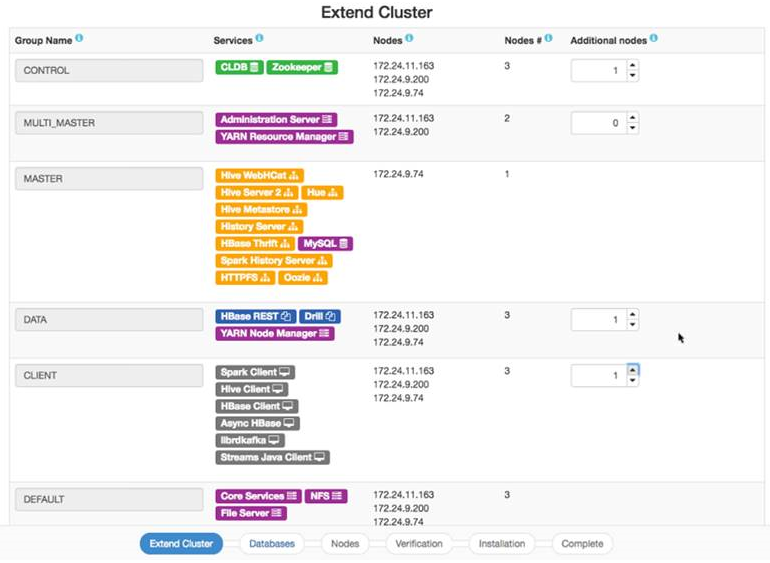
- On-Premise Cluster
Adding Nodes Using a Installer Stanza
About this task
scaled_hosts2: parameter
(on-premise clusters) or the scaled_count: parameter (cloud-based
clusters) to the Stanza file for the group that you want to scale. Then you run the
Stanza using the install command. The services contained in the
group are configured for the added node.NOTE
If the group you are trying to scale
does not contain the mapr-core-5.2.x service, the first group
containing mapr-core-5.2.x will automatically get
scaled.