Install Data Fabric Software
Describes the process for installing Data Fabric software in a hardened OS environment.
Installing Data Fabric software involves several key steps to ensure that the software is installed and configured correctly across a multi-node environment.
Disable apparmor
AppArmor (Application Armor) is a Linux security module that provides mandatory access control (MAC) by restricting the capabilities of individual applications based on predefined security profiles. Disabling AppArmor facilitates the deployment and operation of Data Fabric components, which may require broader system access than what AppArmor profiles permit, especially on a hardened OS where security policies are already in place through other means.
systemctl disable apparmorInstall all required software depenedencies on all nodes
- Run sysctl -p /etc/sysctl.conf
- Execute this
command:
zypper install \
  vim \
  wget \
  java-17-openjdk.x86_64 \
  java-17-openjdk-devel.x86_64 \
  epel-release \
  ncurses-compat-libs \
  python3-pyparsing \
  syslinux \
  syslinux-nonlinux \
  systemtap-sdt-devel \
  compat-openssl11 \
  perl \
  perl-Algorithm-Diff \
  perl-Archive-Tar \
  perl-Archive-Zip \
  perl-Attribute-Handlers \
  perl-AutoSplit \
  perl-autouse \
  perl-Benchmark \
  perl-bignum \
  perl-blib \
  perl-Compress-Bzip2 \
  perl-Compress-Raw-Lzma \
  perl-Config-Extensions \
  perl-Config-Perl-V \
  perl-CPAN \
  perl-CPAN-DistnameInfo \
  perl-CPAN-Meta \
  perl-CPAN-Meta-Requirements \
  perl-CPAN-Meta-YAML \
  perl-Data-OptList \
  perl-Data-Section \
  perl-DB_File \
  perl-DBM_Filter \
  perl-debugger \
  perl-deprecate \
  perl-devel \
  perl-Devel-Peek \
  perl-Devel-PPPort \
  perl-Devel-SelfStubber \
  perl-Devel-Size \
  perl-diagnostics \
  perl-Digest-SHA1 \
  perl-DirHandle \
  perl-doc \
  perl-Dumpvalue \
  perl-Encode-devel \
  perl-encoding \
  perl-encoding-warnings \
  perl-English \
  perl-Env \
  perl-experimental \
  perl-ExtUtils-CBuilder \
  perl-ExtUtils-Command \
  perl-ExtUtils-Constant \
  perl-ExtUtils-Embed \
  perl-ExtUtils-Install \
  perl-ExtUtils-MakeMaker \
  perl-ExtUtils-Manifest \
  perl-ExtUtils-Miniperl \
  perl-ExtUtils-MM-Utils \
  perl-ExtUtils-ParseXS \
  perl-fields \
  perl-FileCache \
  perl-File-DosGlob \
  perl-File-Fetch \
  perl-File-HomeDir \
  perl-filetest \
  perl-File-Which \
  perl-Filter \
  perl-Filter-Simple \
  perl-FindBin \
  perl-GDBM_File \
  perl-Hash-Util \
  perl-Hash-Util-FieldHash \
  perl-I18N-Collate \
  perl-I18N-LangTags \
  perl-Importer \
  perl-inc-latest \
  perl-IO-Compress-Lzma \
  perl-IO-Zlib \
  perl-IPC-Cmd \
  perl-IPC-SysV \
  perl-JSON-PP \
  perl-less \
  perl-libnetcfg \
  perl-Locale-Maketext \
  perl-Locale-Maketext-Simple \
  perl-local-lib \
  perl-Math-BigInt-FastCalc \
  perl-Math-BigRat \
  perl-Memoize \
  perl-meta-notation \
  perl-MIME-Charset \
  perl-Module-Build \
  perl-Module-CoreList \
  perl-Module-CoreList-tools \
  perl-Module-Load \
  perl-Module-Load-Conditional \
  perl-Module-Loaded \
  perl-Module-Metadata \
  perl-Module-Signature \
  perl-MRO-Compat \
  perl-Net \
  perl-Net-Ping \
  perl-NEXT \
  perl-Object-HashBase \
  perl-ODBM_File \
  perl-Opcode \
  perl-open \
  perl-Package-Generator \
  perl-Params-Check \
  perl-Params-Util \
  perl-perlfaq \
  perl-PerlIO-via-QuotedPrint \
  perl-Perl-OSType \
  perl-ph \
  perl-Pod-Checker \
  perl-Pod-Functions \
  perl-Pod-Html \
  perl-Safe \
  perl-Search-Dict \
  perl-SelfLoader \
  perl-sigtrap \
  perl-Software-License \
  perl-sort \
  perl-Sub-Exporter \
  perl-Sub-Install \
  perl-Sys-Hostname \
  perl-Sys-Syslog \
  perl-Term-Complete \
  perl-Term-ReadLine \
  perl-Term-Size-Any \
  perl-Term-Size-Perl \
  perl-Term-Table \
  perl-Test \
  perl-Test-Harness \
  perl-Test-Simple \
  perl-Text-Abbrev \
  perl-Text-Balanced \
  perl-Text-Diff \
  perl-Text-Glob \
  perl-Text-Template \
  perl-Thread \
  perl-Thread-Semaphore \
  perl-Tie \
  perl-Tie-File \
  perl-Tie-Memoize \
  perl-Time \
  perl-Time-Piece \
  perl-Unicode-Collate \
  perl-Unicode-LineBreak \
  perl-Unicode-Normalize \
  perl-Unicode-UCD \
  perl-User-pwent \
  perl-utils \
  perl-vmsish
Install required MAPR packages on all nodes
zypper -y install \
  mapr-cldb \
  mapr-zookeeper \
  mapr-s3server \
  mapr-collectd \
  mapr-apiserver \
  mapr-webserver \
  mapr-fileserver \
  mapr-nfs \
  mapr-mastgateway \
mapr-opentsdb- If prompted with any warnings or errors, choose the ignore option (i) and proceed with installation.
- mapr-cldb and mapr-zookeeper are required for only 3 nodes in the cluster. Plan the services according to the cluster requirements and modify the above command as needed.
Add the Mapr disk to the cluster
echo -e "/dev/sda" > /tmp/disklist.txt/opt/mapr/server/disksetup -F -W 1 /tmp/disklist.txt After the services are installed and disks are added, start the cluster configuration.
Validate the MAPR services on all nodes
maprcli service list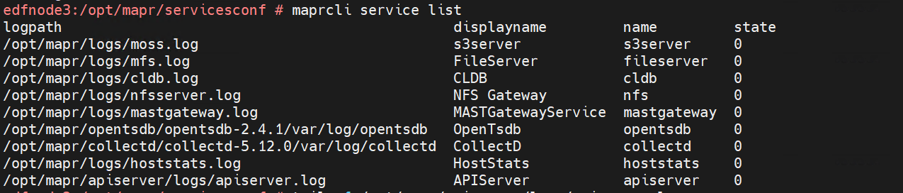
Configure the Data Fabric cluster on Node 1 only
/opt/mapr/server/configure.sh \
  -C edfnode1.ftc.local,edfnode2.ftc.local,edfnode3.ftc.local \
  -Z edfnode1.ftc.local,edfnode2.ftc.local,edfnode3.ftc.local \
  -OT edfnode1.ftc.local,edfnode2.ftc.local,edfnode3.ftc.local \
  -N ftcmapr.ftc.local \
  -secure \
  -genkeys \
-no-autostart- C = CLDB
- Z = Zookeeper
- OT = OpenTSDB
- N = the name of the cluster (in this example, ftcmapr.ftc.local
/opt/mapr/server/configure.sh \
  -C edfnode1.ftc.local,edfnode2.ftc.local,edfnode3.ftc.local \
  -Z edfnode1.ftc.local,edfnode2.ftc.local,edfnode3.ftc.local \
  -OT edfnode1.ftc.local,edfnode2.ftc.local,edfnode3.ftc.local \
  -N ftcmapr.ftc.local \
  -secure \
  -dare \
  -genkeys \
-no-autostartStart and enable the Zookeeper and Warden services on Node 1 only
systemctl start mapr-zookeeper
systemctl start mapr-warden
systemctl enable --now mapr-zookeeper
systemctl enable --now mapr-warden
Copy configurations from Node 1 to all nodes in the cluster
- From Node 1, copy the contents of the /opt/mapr/conf/tokens directory
to the /opt/mapr/conf/token directory on all nodes.
cd opt/mapr/conf/tokens scp -r * root@172.18.207.13:/opt/mapr/conf/tokens - Copy files to the destination nodes.If your cluster consists pf all secure, non-FIPS-enabled nodes, follow the instructions below to copy files to the destination nodes - those nodes in which the -genkeys option was not used to generate keys.
scp \ maprhsm.conf \ maprkeycreds.conf \ maprkeycreds.jceks \ maprserverticket \ maprtrustcreds.conf \ maprtrustcreds.jceks \ ssl_keystore \ ssl_keystore.p12 \ ssl_keystore.pem \ ssl_keystore-signed.pem \ ssl_truststore \ ssl_truststore.p12 \ ssl_trust \ store.pem \ ssl_userkeystore \ ssl_userkeystore.p12 \ ssl_userkeystore.pem \ ssl_userkeystore-signed.pem \ ssl_usertruststore \ ssl_usertruststore.p12 \ ssl_usertruststore.pem \ root@172.18.207.12:/opt/mapr/conf - After the files are copied to the other nodes, execute this
command:
/opt/mapr/server/configure.sh \ -C edfnode1.ftc.local,edfnode2.ftc.local,edfnode3.ftc.local \ -Z edfnode1.ftc.local,edfnode2.ftc.local,edfnode3.ftc.local \ -OT edfnode1.ftc.local,edfnode2.ftc.local,edfnode3.ftc.local \ -N ftcmapr.ftc.local \ -secure \ -no-autostart - Start and enable Zookeeper and Warden in their respective nodes. In our
example, Zookeepr and Warden are on Node
3.
systemctl start mapr-zookeeper
systemctl start mapr-warden
systemctl enable --now mapr-zookeeper
systemctl enable --now mapr-warden