What's New in Release 8.2
Describes the new features in release 8.2 and provides links to more information.
Following are some new features and capabilities that distinguish release 8.2.0 from the previous release (8.1.0):
Migration of Existing S3 Buckets to Inline Erasure Coding (IEC)
Data Fabric 8.2.0 introduces the ability to convert existing scheduled Erasure Coding (EC) S3 buckets to Inline Erasure Coding (IEC) in place, eliminating the need to delete, recreate, or re-ingest data into new buckets.
Once migrated, incoming object writes are erasure-coded and protected inline during
ingestion rather than relying on delayed scheduled tiering and compaction jobs.
Administrators can perform and coordinate the migration using the mossdb manage
migrateToInstantEC command along with standard volume offload verification
workflows.
For complete migration prerequisites, shared-volume constraints, and step-by-step instructions, see Migrating S3 buckets to Inline Erasure Coding (IEC) buckets.
Air-Gapped Repository for Data Fabric Installation
The Data Fabric air‑gapped repository is a package repository that is hosted on a network with no internet access (an air‑gapped environment), so that you can install or update Data Fabric software without connecting to the internet.
You can install Data Fabric by creating an air-gapped repository on a local mirror that hosts the Data Fabric packages offline. You can use the air-gapped repository to download Data Fabric packages for Data Fabric installation, without having to connect to the internet.
You would need to connect to the internet only to update the packages hosted on air-gapped repository with the latest Data Fabric patches and release versions, whenever they are made available by HPE.
See Installing with the Air-Gapped Data Fabric Repository for details.
Object Copier Hub Enhancements
- The Object Copier Hub integrates with CLDB making it the single source of truth for the copier configuration
- The Object Copier Hub is registered as a Warden-managed service, as against a stand-alone service in Data Fabric 8.1.
- The Object Copier Hub provides audit logging for each copier.
- The
ochcluster-level permission is required to control administrative operations for copiers. - New maprcli commands have been introduced for Object Copier Hub functionality. The maprcli commands replace the och-cli commands from the earlier release. See och-instance for maprcli commands.
Server-Side ACE and PBS Access Checks for NFSv4
Data Fabric 8.2.0 introduces support for server-side permission enforcement over NFSv4 for resources governed by MapR Access Control Entries (ACEs / ACLs) or Policy-Based Security (PBS).
By enabling the new support_server_aces configuration setting in NFSv4,
local metadata cache (mdcache) access checks are bypassed in favor of FSAL
server-side test access. This ensures that all permission validations for files and
directories configured with MapR ACEs or PBS policies are executed directly on the MapR File
System (MFS) server. See Configuring the NFSv4 Server for details.
Spark MCP Server Multi-catalog Support
Data Fabric 8.2 introduces multi-catalog support in the Spark Model Context Protocol (MCP) server. Administrators can now configure and query multiple Iceberg catalogs simultaneously—including both Polaris and Hive metastores—within a single Spark MCP server instance. See Data Fabric MCP Server Settings for details.
Agentic AI and MCP Integration for Data Catalog and Airflow
Data Fabric 8.2.0 extends the Model Context Protocol (MCP) server to integrate with Apache Polaris data catalogs and Apache Airflow orchestration. AI agents and MCP-compliant clients (such as Claude Code) can discover Iceberg tables, execute Spark SQL queries against MapR-FS data, and inspect, trigger, or safely deploy Airflow DAGs using tokenized review workflows. All interactions leverage Keycloak SSO and OAuth 2.0 PKCE to enforce end-to-end user identity propagation and cluster security policies.
See Airflow MCP Integration for Agentic AI for configuration and usage details.
Data Fabric UI Enhancements
- Seed Node Pre-check and Preparation: A new wizard is available to create the first fabric by using the seed node. The seed node installer checks if the host machine meets the Data Fabric installation requirements, and installs the packages required by the Data Fabric installation. See Installing with a Seed Node for changes to the installation steps.
- Object Copier Hub Rule Configuration: Data Fabric UI supports the management of replication rules used by the Object Copier Hub. See Managing Object/Data Movement from Amazon Web Service Bucket to Data Fabric Bucket or Across Fabrics for Object Copier Hub rule management from the Data Fabric UI.
- API Server OpenAPI/Swagger Support: Modernized the API Server Swagger interface
to OpenAPI 3.x, ensuring full compatibility with Java 17 runtimes and strict Content
Security Policy (CSP) configurations. The interactive explorer is accessible at
/app/swagger/. - Change Cluster Administrator Password: You can now update and rotate the
cluster administrator (
mapruser) password directly from the Data Fabric UI post-deployment. Updating the administrator password in Data Fabric UI automatically synchronizes credentials across all cluster nodes and updates the secure credential vault, ensuring subsequent lifecycle operations—such as scaling nodes, applying upgrades, or modifying services - continue without interruption. See Changing the Cluster Administrator password in Data Fabric UI for details. - Data Fabric UI Advanced Volume Management: The Data Fabric UI now supports advanced volume configurations, enabling administrators to manage security and encryption, audit logging, advisory quotas, and warm tiering directly within the interface without relying on MCS or the CLI. For more information, see Advanced Volume Configurations support in Data Fabric UI.
Important features introduced in the earlier releases
The major features introduced in the earlier Data Fabric releases are listed below for your reference.
Object LifecycleThe object lifecycle can be used to manage the expiration and auto-deletion of expired versioned and non-versioned objects, that reside on the object store buckets. See Object Lifecycle for details about the object lifecycle.
See mc ilm to manage object lifecycle management rules by using the CLI.
See mc admin ilm-scanner to start, stop, monitor, and control scan throttling.
You can copy objects across fabrics or from AWS S3 buckets to Data Fabric buckets using the Object Copier Hub.
The Object Copier Hub is a service that must be installed on the node from which you wish to initiate the copying of objects. You can initiate the copy operation from a node that is not a part of a fabric created with Data Fabric.
The Object Copier Hub facilitates the addition of the source bucket - destination bucket pairs so that objects can be copied from the source bucket onto the destination bucket.
When the copy operation is be carried out across fabrics, the source bucket would belong to the S3 object store on one fabric and the destination bucket would belong to the S3 object store on another fabric.
When the copy operation is be carried out from an AWS S3 bucket to a bucket on a fabric created with Data Fabric, the source bucket would belong to AWS S3 and the destination bucket would belong to the S3 object store on the fabric.
See Moving Objects Across Fabrics and from AWS S3 to Fabric for more information about Object Copier Hub and moving objects across fabrics or from Amazon S3 to a fabric.
Inline erasure coding or instant tiering is a new feature that facilitates the backing up of data from front-end volumes is to backend volumes without the need for a schedule. The instant tiering process is a continuous one and helps with storage optimization as against the traditional scheduled tiering that has been available in HPE Data Fabric from the 6.2 release.
For information on inline erasure coding or instant tiering, see Inline Erasure Coding.
To understand the differences between non-line erasure coding (scheduled tiering) and inline erasure coding (instant tiering), see Non-inline Erasure Coding Vs Inline Erasure Coding.
The Flink SQL client can be used for sourcing and sinking data between Data Fabric Streams and Iceberg tables managed by DEP Polaris. See Flink SQL Client and Iceberg Integration Demofor an integration demo.
Data Fabric 8.1.0 adds Polaris integration with Global Namespace (GNS), enabling you to run Spark analytics across multiple clusters, accessing Polaris catalogs and data on remote clusters through external storage and Polaris Federation, without moving data. See Polaris and Global Namespace Integration Support for more information.
Data Fabric 8.1.0 introduces Polaris MCP integration, enabling you to configure Polaris as a metastore for Apache Spark and expose MCP endpoints for streamlined data catalog access across your Data Fabric environment. See Configuring Polaris as a metastore for Spark for more information.
HPE Ezmeral Data Fabric is HPE Data Fabric from release 8.0.0.
HPE Ezmeral Ecosystem Pack is Data Fabric Ecosystem Pack from Data Fabric Ecosystem Pack release 10.0.0.For details on changes to product branding, see Data Fabric Branding Changes.
AI readiness with HPE Data Fabric MCP (Model Context Protocol) serverThe HPE Data Fabric MCP server facilitates a secure model-to-data interaction and provides compatibility with diverse AI tools. Any MCP-compliant client and LLM can securely query HPE Data Fabric by using a MCP architecture and Spark-powered execution.
Every request is verified, scoped, and enforced at multiple layers to ensure explicit trust between services, users, or components.The HPE Data Fabric MCP server is integrated with Keycloak, and supports LDAP, and any enterprise IAM. The HPE Data Fabric MCP server supports JWT tokens for fabrics that are integrated with Keycloak as the SSO provider.
All access flows are routed through the HPE Data Fabric MCP server.Every access request is tied to a validated user identity and all access flows through the HPE Data Fabric MCP server.
See Model Context Protocol (MCP) for more information.
Java version supportFrom release 8.0.0 onwards, HPE Data Fabric requires JDK 17 as the minimum JDK version. If the JDK version is lower than 17, some of the critical services, including the Data Fabric UI, do not come up.
Before upgrading from an earlier HPE Data Fabric version to release 8.0.0, ensure that you install JDK 17. The java, javac commands must point to JDK 17.In rare scenarios, the upgrade to JDK 17 could impact customer applications that are not compatible with JDK 17.
HPE Data Fabric 8.0.0 supports JDK 21.See Java support matrix for information on JDK versions supported by different HPE Ezmeral Data Fabric releases.
- Restructured layout for cleaner, unified and more intuitive user experience
- Unified experience for all users and roles
- Support for various user roles and enable/disable features and Data Fabric UI components
- Custom configuration for cloud deployment that enables you to define a custom or suitable cloud instance type, disk size and node counts suited for your workload, to meet performance, memory usage and cost requirements.
- Custom database configurations for Data Fabric Ecosystem Pack (DEP) service installation while creating a fabric.
- Upgrade a DEP service without recreating the fabric on which the service is installed.
Data Fabric supports the import of HPE Alletra MP X10000 object storage as an external S3 server into a cluster group or global namespace by using the maprcli and the Data Fabric UI. For more information, see clustergroup addexternal. To import HPE Alletra MP X10000 from the Data Fabric UI, see Importing an external S3 server.
Librdkafka Updated to Version 2.6.0Beginning with release 7.10.0 and EEP 9.4.0, librdkafka is now updated to version 2.6.0.
The Data Fabric 7.10 release supports C API Librdkafka 2.6.0 for HPE Data Fabric Streams. See the following topics for details:
Release 7.6.1 introduced support for IPv6 addresses and support for clusters that have a
mix of IPv6 and IPv4 addresses. A new option in the configure.sh script enables
the configuration of IPv6 support. For more information, see IPv6 Support in Data Fabric and configure.sh.
Release 7.6.1 introduced support for the Iceberg table format. You can use Apache Spark to query Iceberg tables stored in the Data Fabric and perform other operations to take advantage of Iceberg features. For more information, see Iceberg Support and Getting Started with Iceberg.
Support for Third-Party Storage SolutionsWith release 7.6.1, the HPE Data Fabric offers global namespace support for NFS- and S3-protocol operations performed against WEKA, VAST Data, Scality, and other third-party, object-storage solutions.
For more information, see Third-Party Storage Solutions. External S3 SupportRelease 7.6.1 introduced support for mounting an external NFS server or an external S3 server (including third-party storage solutions) into a cluster group or global namespace. For more information, see clustergroup addexternal.
Release 7.6.1 introduced support for attaching multiple security policies to one, or more than one, volume in a cluster. For more information, see policy attach.
With release 7.6.1, Data Fabric offers global namespace support for NFS- and S3-protocol operations performed against WEKA, VAST Data, Scality, and other third-party, object-storage solutions.
For more information, see Third-Party Storage Solutions.mapr-collectdmapr-elasticsearchmapr-fluentdmapr-grafanamapr-kibanamapr-opentsdb
https://package.ezmeral.hpe.com/releases/v7.8.0/redhat/https://package.ezmeral.hpe.com/releases/MEP/MEP-9.3.0/redhat//releases directory of package.ezmeral.hpe.com
includes two suse repositories: 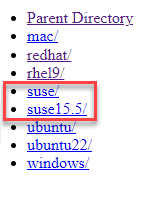
suse15.5 repository is new and enables support for NFS or NFS v4 for
installations on SLES 15 SP3 and SP5. To use the old and new suse
repositories, see this table:| Repository | Use this respository to install | NFS Support |
|---|---|---|
suse |
SLES 15 SP2 | NFS |
suse15.5 |
SLES 15 SP3 or SP4 or SP5 | NFS or NFS v4 |
.rpm, .tar.gz,
.zip, and .tgz files for the following Data Fabric products:- core 7.6.1 and later
- Data Fabric clients
- Ecosystem Pack (EEP) 9.2.1 and later
- Installer 1.18.0.5 and later
| Description | URL | Authentication Required? |
|---|---|---|
| New repository | https://package.ezmeral.hpe.com/ | Yes |
| Old repositories | https://package.mapr.com/ | Yes1 |
If you plan to use the Data Fabric Installer, you must update the Installer to the most current 1.18.0.3 version or later. Earlier versions of the Installer will not work with the new repository. See Updating the Installer.
Release 7.8.0 requires EEP 9.3.0 or later. EEP 9.3.0 is new for this release and delivers updates to various ecosystem components but no new components. EEP 9.3.0 can only be used with release 7.8.0.
For more information about new features delivered as part of the Ecosystem Pack, see What's New in EEP 9.3.0. For reference information, see EEP 9.3.0 Reference Information.For information about the EEPs that can be used with different versions of core releases, see Ecosystem Pack Support and Lifecycle Status.
SSO Support for KeycloakRelease 7.8.0 supports SSO when configured with the Keycloak identity and access management (IAM) solution. Other IAM solutions are not currently supported.
Configuring SSO is optional. If you do not configure SSO, you must use Data Fabric user names and passwords for access to the fabric. While SSO is supported for Data Fabric core, it is not currently supported for ecosystem components or the Installer.- Install the
mapr-keycloakpackage as part of cluster creation - Specify the
-keycloakoption when you run the configure.sh script
- 7.8.0 (DAG 6.3.0.1)
- 7.7.0 (DAG 6.3)
- 7.6.1 (DAG 6.2)
- 7.5.0 (DAG 6.2)
- 7.4.0 (DAG 6.1)
- 7.3.0 (DAG 6.0)
As indicated in the Java Support Matrix, release 7.8.0 can be used in JDK 11 or in JDK 17 installations. EEP 9.3.0 can also be used in JDK 11 or JDK 17 installations. However, the Installer is supported only on JDK 11, and if new cluster nodes require a JDK at installation time, the Installer can only install JDK 11.