Migrating from SUSE SP5 TO SP7 (ERE 5.7.4)
Prerequisites
-
The ERE controller is configured with HA (primary, shadow, arbiter).
-
The Kubernetes cluster has 3 masters.
-
Recommended: 2 or more gateways, using a common gateway hostname (a DNS name that is not a node's own hostname).
Note:- A single gateway whose hostname equals its node hostname causes client impact during migration unless DNS is mapped (see Gateways).
-
Take a backup(mainly :-Erlang db & Kubernetes ETCD) before starting. Check cluster health before every step.
-
If your environment uses a proxy, complete the extra proxy configuration for SP7 before you add an SP7 nodes to ERE. See Before adding SP7 Nodessection for more information.
Procedure
ERE CONTROLLERS
-
Check HA is healthy with bdconfig --hainfo command.NOTEHA failover only support for Suse from 5.7.4 version.
-
Upgrade ERE from 5.7.3 GA to 5.7.4 (ERE platform only).
-
Epic-maprupgrade:-
Up to ERE 5.7.3, there is no epic-mapr upgrade logic. A platform upgrade did not upgrade the epic-mapr container. A cluster deployed with ERE 5.7.1 or older therefore still runs its old epic-mapr version (for example 6.1.0-GA-… ), even after upgrading to 5.7.4.
-
ERE 5.7.4 adds the upgrade logic, but it does not run automatically. You must run upgrade_epic_mapr.sh manually. The latest version ( mapr:7.9.0.30.20251025070711.GA-3 ) is required to support cgroup v2, so this upgrade is mandatory.
See Epic MapR Upgrade for detailed information.
-
-
Disable HA in the ERE UI. Remove the SP5 shadow and arbiter, reinstall them with SP7 and cgroup v2, and add them back to HA.
-
When HA is healthy again, fail over to the shadow:
bdconfig
                                --hafailover
. -
Disable HA again. Remove the old primary (still SP5), reinstall it with SP7 and cgroup v2, and add it back to HA.
-
Confirm HA is healthy:
bdconfig --hainfo.
ERE GATEWAYS
- For Two or more gateways:
Remove one node at a time, install SP7 (with cgroup v2) on it, and add it back. Continue only when the previous gateway is Ready. No client impact clients connect via the Gateway sets common DNS hostname(See Gateway Hosts ), so traffic automatically fails over to the remaining Ready gateway(s) while one node is being reinstalled.
- For One Gateway:
- Add a second gateway on SP7(with cgroup v2) , joining the same Gateway set i.e., configured with the same common DNS hostname as the first. (If the common hostname was originally set to the first node's own hostname, use that same name for the second gateway too, so clients keep resolving the same name throughout.)
- When both gateways are Ready, remove the first (SP5) gateway, install SP7 with cgroup v2 on it, and add it back to the set.
- When the first gateway is back and Ready, decommission the second (temporary) gateway and revert the DNS record to the original singlehost mapping if it was changed.
- Gateway hostname is a common DNS name: point the DNS record at the second gateway during the window, then switch it back. No client change needed.
- Gateway hostname equals the node hostname (not per Gateway set requirements:- Gateway Hosts ) : clients keep connecting to the old node and see errors. Plan a short outage, or temporarily map the hostname to the second gateway's IP.
Kubernetes
-
For Workers:
Drain, remove(from the ERE UI, you can perform this operation by editing the cluster section), install SP7 (with cgroup v2), and add back, one node at a time.NOTEBefore draining a node, make sure the remaining nodes in the cluster have enough CPU and memory to run that node's workload -
For Masters:
Use 3 masters: Remove, install SP7, and re-add them one at a time waiting for each to be healthy. Etcd needs a majority (quorum): 3 nodes tolerate 1 failure; 2 nodes
For a Single Master: First add masters to reach 3. Do not run with 2.
-
NOTEERE's current node-removal process has a known limitation: it doesn't fully clean up the backend cluster database (etcd) when a master node is removed. The UI/records update correctly and look clean, but a stale leftover entry can remain behind the scenes. This requires a manual cleanup step before the same node can be safely re-added.Manually clean up etcd on a surviving master. you can find
certs/endpoints(typically under/etc/kubernetes/pki/etcd/).
For example:$ sudo etcdctl --endpoints=https://127.0.0.1:2379 --cacert=/etc/kubernetes/pki/etcd/ca.crt --cert=/etc/kubernetes/pki/etcd/server.crt --key=/etc/kubernetes/pki/etcd/server.key member list -w table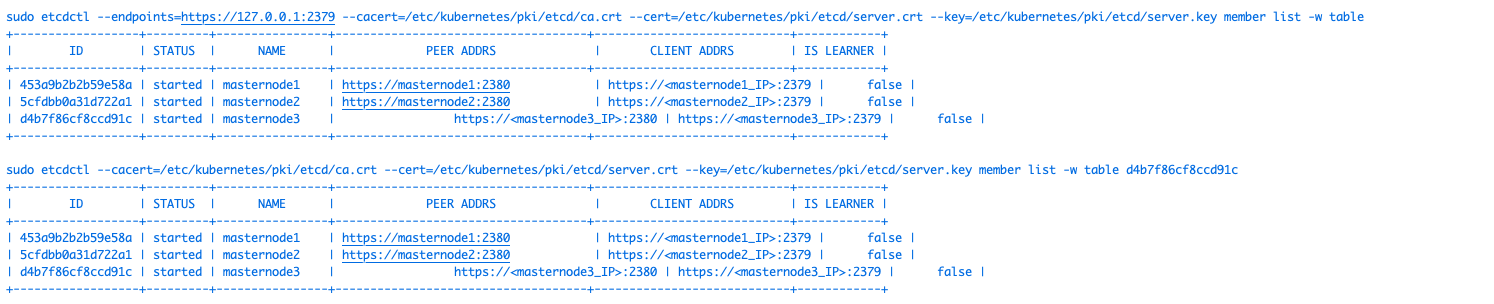
- Remove stale member entry:NOTEBefore removing a member, double check the node name/IP in the list matches the node you actually want to remove. Removing the wrong one can break the cluster, and it can't be undone.
sudo etcdctl --endpoints=https://127.0.0.1:2379 --cacert=/etc/kubernetes/pki/etcd/ca.crt --cert=/etc/kubernetes/pki/etcd/server.crt --key=/etc/kubernetes/pki/etcd/server.key member remove <ID>For example: Member d4b7f86cf8ccd91c removed from cluster c8c3713f9c159246

- Double check etcd is healthy/quorate before
proceeding:
For example:sudo etcdctl --endpoints=https://127.0.0.1:2379 --cacert=/etc/kubernetes/pki/etcd/ca.crt --cert=/etc/kubernetes/pki/etcd/server.crt --key=/etc/kubernetes/pki/etcd/server.key endpoint health --cluster
- Verify no stale Node object remains:
kubectl get nodes kubectl delete node <node-name> # only if it still shows up - Install OS (SP7) & apply cgroup v2 (cg2) config, then re-add/re-join the host using the same hostname.
After Migrating Kubernetes Nodes to SP7
- If your environment uses a proxy, complete the extra proxy configuration for ezdaemon service before you upgrade to 1.35 Kubernetes . See Topic 2: Before a Kubernetes upgrade add proxy configuration in ezdaemon service for all k8s nodes. See Before performing a Kubernetes upgrade for details.
- Ensure the hostname and the output of
hostname -fmatch:hostname;hostname -f - If applicable, consider the following known issue When you add LDAP/AD authentication with StartTLS.